monomind 2.8.0: Google Antigravity Support Arrives
monomind grows up into a genuinely multi-platform agent CLI

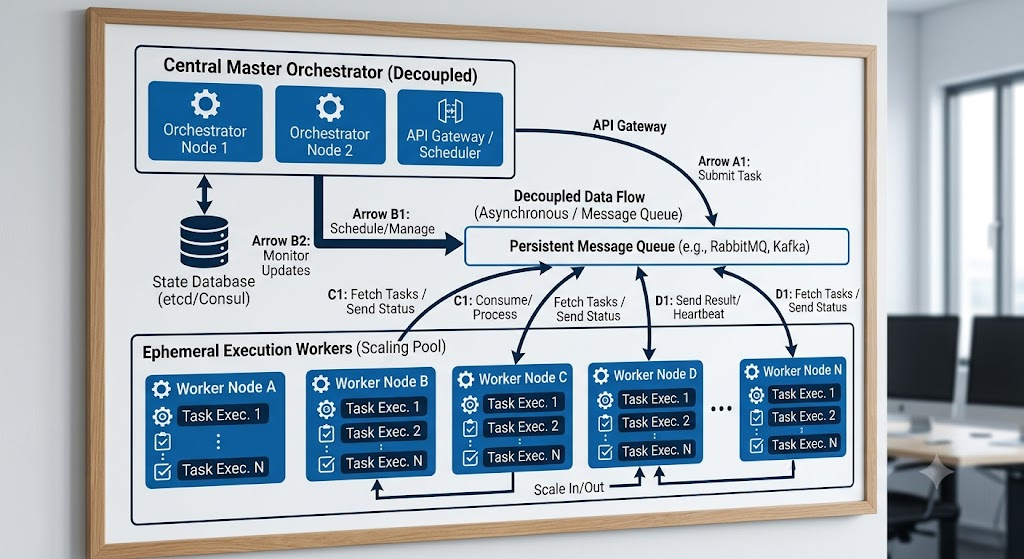
monomind init now speaks Antigravity by default.
monomind started as a CLI and MCP server built around Claude Code. With 2.8.0, that changes in a meaningful way: monomind now generates native, working configuration for Google Antigravity out of the box, and the underlying provider system took its first real step toward supporting non-Anthropic model backends.
This release isn't about adding a flag behind a feature gate - Antigravity is now the default output of monomind init. If you're on Claude Code, opencode, or Kimi Code, nothing changes for you. If you're on Antigravity, monomind now understands your editor natively.
Google Antigravity Support & Multi-Platform Init
Why Antigravity, and why default
Multi-platform is a first-class goal, not an afterthought
monomind is fundamentally a CLI plus an MCP server - the same core plugs into any editor or agent platform that speaks MCP. Claude Code has always been the primary, best-supported target, but the project has steadily added others: opencode, Kimi Code, and now Google Antigravity.
Antigravity gets first-class treatment in 2.8.0 rather than an opt-in flag like opencode (--opencode) or Kimi Code (--kimicode). Running monomind init with no platform flags now produces Antigravity-native files automatically: a GEMINI.md project brief, a .gemini/rules/ directory, helper scripts under .gemini/helpers/statusline.*, and a .gemini/settings.json that wires it all together.
Key Takeaways
- ✓Antigravity config generation is monomind init's default behavior, not a flag
- ✓opencode and Kimi Code remain additive opt-in flags (--opencode, --kimicode)
- ✓Generated files include GEMINI.md, .gemini/rules/, .gemini/helpers/statusline.*, and .gemini/settings.json
A status bar, and new provider kinds under the hood
Beyond config files, Antigravity users get a status bar integration through the generated helper scripts - a small but concrete piece of editor-native tooling that reflects what monomind is doing as you work.
On the org runtime side, 2.8.0 introduces gemini and openai as provider kinds. It's worth being precise about what that means: these are authentication and environment kinds - for example, wiring up a GEMINI_API_KEY - not a dedicated Gemini execution runner. There is no GeminiAgentRunner in this release. What did land alongside the provider kinds is the Antigravity execution runner itself. monomind's set of execution runners (Claude, opencode, Kimi Code, Vercel AI SDK, Codex, and Antigravity) has been built up incrementally across releases; 2.8.0 is the release where Antigravity's runner and the gemini/openai provider kinds arrived, not the release where all of them shipped at once.
# Default: generates Antigravity-native config (GEMINI.md, .gemini/rules/, .gemini/settings.json)
monomind init

# Opt in to opencode config alongside the default output
monomind init --opencode

# Opt in to Kimi Code config alongside the default output
monomind init --kimicode“Antigravity's runner and the new gemini/openai provider kinds are the concrete pieces that shipped in 2.8.0 - everything else on the multi-platform roadmap keeps building from here.”
- Monomind Core Team
What this means if you're not on Antigravity
If you're using Claude Code, opencode, or Kimi Code, this release changes nothing about your workflow - monomind init still produces the same output it always has for you, gated behind the same flags.
For teams standardizing on Google's editor, 2.8.0 is the first release where monomind treats Antigravity as a peer to Claude Code rather than an edge case, and it sets up the provider layer for further non-Anthropic backend work down the line.

Key Takeaways
- ✓gemini/openai provider kinds configure auth and environment, not a new agent runner
- ✓The Antigravity execution runner shipped in 2.8.0; the other runners arrived across earlier and later releases
- ✓monomind is Apache-2.0 licensed
Conclusion & Future Outlook
2.8.0 is a focused release: real Antigravity support, generated by default, plus the provider groundwork for more backends to come. Nothing here is speculative - it's the config files, helper scripts, and runner code monomind actually ships.
If you install monomind fresh today, run monomind init and you'll see the Antigravity files land automatically. Add --opencode or --kimicode if you need those platforms too.
Deploy Monomind Digital Workers Today
Run open-source AI agent teams on your own infrastructure or hire Monoes Workforce to build and audit fully managed operations.
0 comments
No comments yet.